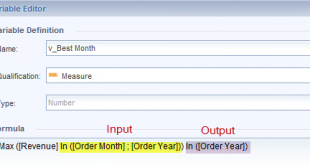
So what do you do when the report design requirements for a webi report call for customizations beyond the default aggregation? Modifying Context to Customize Web Intelligence Calculations The default aggregation in Web Intelligence provides a dynamic way to transform data on the fly. With simple drag, drop, and mouse …
Read More »Webinar: WebI 4.1 SP06 Free-Hand SQL Queries, New Input Controls, and More
Join us and BO Expert, Adam Lange, as we take an in-depth look at support package 6, the latest upgrade for SAP BI 4.1. Recently released this summer, the new support package includes several exciting features for Web Intelligence, including free-hand SQL data sources, global input controls, multi-column selections, and …
Read More »Why Visual Design Studio will NEVER replace Xcelsius
This week I was invited by an SAP BusinessObjects customer to participate in a discussion with SAP regarding whether they should use Visual Design Studio or Xcelsius to develop new dashboard based BI applications for a new project. The representatives from SAP explained the roadmap for their BI tools that …
Read More »Let’s Speak BO Webinar: Charting Data in Web Intelligence 4.1 – July 28th – 10AM PT/1PM ET
Join Adam Lange in a fantastic and informative webinar dedicated the what’s new with Web Intelligence 4.1. The charts offered in Web Intelligence XI 3.1 were notoriously limited in their functionality and effectiveness. In the latest version, Web Intelligence 4.1, SAP introduced many improvements to the chart engine which allow …
Read More »Web Intelligence XI R2- Modifying Color Palettes
Question: I don’t see a way, in Web Intelligence, to change the color of individual data point on a chart. Is there a way to do this? Answer: Unfortunately, there is not a way to modify the color of an individual data point in a chart. You can, however, modify …
Read More »Web Intelligence – Show Message When “No Data to Fetch”
How to Show a friendly message when “No Data to Fetch” When your data provider(s) return no data, the document looks pretty ugly. It will typically show column headers without any content, zero totals, and some formulas may even display embarrassing error messages. So let’s use conditional blocks (see “Get …
Read More »BusinessObjects – Adding Logos for Use on Reports
Question: How can I set up our company logo, to appear in Web Intelligence, in the header? Answer: Since you cannot embed pictures and objects in Web Intelligence XIR2 and prior, they must be set up as images or skins available as a “Backgrounds” or “URL Links”. To store …
Read More »Web Intelligence XI R2: Calculations Interacting with Alerter Output
Question: I have a need to show dates, in a column, that fall into a certain date range (1-5 days). In the second column, show dates that fall into a second date range (6-10 days). At the bottom of each column, display a count of the dates that fall into …
Read More »Web Intelligence – Copying Data to MS Word, Excel, or PowerPoint
Question: In BusinessObjects XI R2, how do I copy Web Intelligence Report Data to other applications such as Microsoft Word, Excel or PowerPoint? Answer: In XI R2, you have the ability to copy data from a Web Intelligence report into other applications such as Microsoft Word, Excel or PowerPoint. With …
Read More »Web Intelligence – Search for an Object
Question: How do I search for an object in Web Intelligence? Answer: Rather than scrolling up and down looking for an object, try this: Click anywhere in the work area and start typing the object name. It highlights the first object beginning with those letters. Then, simply press the down …
Read More »